HMIS Newsletter: September 2026


Announcements 


Income & Public Benefits

Given the changes happening with income supports and public benefits as a result of federal legislation - H.R.1 and the Impact on Affordable and Supportive Housing Residents - National Center for Housing + Health, Housing for Health Division (H4H) staff members will be focusing on improving systemwide data collection in HMIS related to income and public benefits. Please make sure to collect accurate and up-to-date information in this area at enrollment and with regular updates. Your agency and users may be contacted by H4H staff with questions if inaccurate information or data quality issues are identified.


The new Clarity user interface officially goes live tomorrow 10/1!

October 1st marks a major milestone in our journey together as the new Clarity user interface officially becomes the default experience across all Clarity instances. Tomorrow we will officially retire the "Switch Interface" toggle, making the new Clarity User Interface the permanent, standard experience for all users. 


Here is everything you need to know:

  • Automatic System-Level Change -The switch to the new interface will be applied automatically, and . This is a required change, so no action is needed on your end.
  • Early Morning Deployment: - The transition will be completed prior to 8:00 AM ET on October 1st. When you log in for the morning, the new Clarity user interface will be live and ready.
  • Legacy Interface Behavior - Following the changeover, the legacy interface will only display for the limited set of screens that do not yet have a new Clarity UI equivalent.
  • Updated Links - Along with the UI update, links for the Santa Cruz County HMIS General Training and the Santa Cruz: Privacy & Security Training have been updated! Please make sure to save and update your bookmarks with the new training links.


Our team is here to ensure this transition is as smooth and seamless as possible for your community. If you have any last-minute questions or need additional assistance ahead of October 1st, please reach out to our Help Desk at santacruz@bitfocus.com


September 2026 Feature Focus  


Clarity Human Services logo small

Looker Upgraded to Verison 26.12

On September 13th, the Data Analysis Tool was upgraded to Looker version 26.12 during the early-morning maintenance window. No action was required from users as a result of this upgrade.

New features now available:

  • Higher row limits: Table visualizations can now display more than 5,000 rows, up to a new maximum of 50,000. Bitfocus is gradually increasing instance row limits while monitoring performance.
  • KPI Visualization: the Single Value Visualization has been renamed to the KPI Visualization and now supports spark charts and comparison formatting.
  • Google Maps Visualization enhancements: vector maps, dual-axis metric comparison, and contextual/custom overlays are now available.


Looking Ahead: October 2026 Release

Clarity's new user interface is live for all communities! We're still working on some pieces around reports and day-to-day case management, but we're looking forward to hearing how the transition into this modern structure works for you!


This Year's LSA: What to Know and How to Prepare

compliance-department of housing and urban development


HUD's Longitudinal Systems Analysis (LSA) is the annual, system-level report that replaced the AHAR's data component back in the 2018 reporting year. Where the APR/CAPER looks at individual projects and System Performance Measures (SPMs) track CoC-wide benchmarks, the LSA sits in between: a system-level look at households and individuals served, broken out by household type and population, that feeds HUD's national homelessness estimates.

Prep season for the LSA and its companion SPM report kicks off in October. Here's what's new for this year's submission and how your agency can get ahead of it.

What's new in the FY2026 LSA specifications:

  • A new data quality measure separates 4-digit SSNs out from "Missing/Invalid" SSNs.
  • Disability Status now separates "Client Doesn't Know/Prefers Not to Answer" from "Missing/Invalid."
  • The Sex field, which was incorporated in the 2026 Data Standards, will not be analyzed.
  • New project-level DQ measures count Emergency Shelter – Night-by-Night enrollments excluded from the LSA due to missing Bed Night Date service records.


How to prepare your agency's data:

We will be reaching out over the next several weeks to verify or correct program and client data — please look out for those emails and respond promptly. In the meantime, Agency Leads should review their own data ahead of the federal reporting deadline.

  • Run the [HUDX-225] HMIS Data Quality Report for 10/1/25–9/30/26 (Report Library → HUD Reports) and correct any element with an error rate over 5%.
  • Run the[GNRL-106] Program Roster for the same period (Program Based Reports) to confirm households are grouped correctly — some measures only count heads of household.
  • Run the [GNRL-220] Program Details Report to check dates of birth, housing move-in dates, living situation fields, and exit destinations — avoiding "Client doesn't know/Client prefers not to answer/Data not collected" wherever possible.
  • Review bed inventory and utilization rates (aim for 90–105%) and resolve any missing exits or abandoned enrollments.

This review takes about 30 minutes for someone familiar with the program, and the same cleanup benefits both the LSA and the SPM.

Where communities commonly lose usability:

The most common causes of "unusable LSA" reports are: utilization outliers (zero, or unusually low/high), missing projects or enrollments, overlapping bed nights within the same project type, and invalid or missing SSNs. Addressing these now is the best way to ensure a strong reporting year for your community's homeless response system!

Want more detail? Visit HUD's LSA HUD Exchange Page.


Report Spotlight: [HSNG-200] Current Housing Availability


This month's spotlight: [HUDX-111] HUD CSV/XML Program Data Export — updated this month (see Feature Focus above).BITFOCUS_Robust-Reporting_ICON

This report summarizes available bed and unit inventory — by housing project type and program — as of the night before the report is run.

  • Where to run it: Report Library → Housing → [HSNG-200] Current Housing Availability. An Admin version, [HSNG-200-AD], is available under Administrator Reports for cross-agency views.
  • Who can run it: All users can run this report — access is limited only by each user's own permission scope, not by the report itself.
  • How to read it: Current Availability = Capacity − Total in Use. Capacity comes from active bed/unit inventories as of the night before the report runs; what counts as an active enrollment for Total in Use varies slightly by project type (for example, Emergency Shelter – Night-by-Night only counts enrollments with a logged bed-night service for that night).
  • Bonus: you can drill down on the Total in Use numbers to see basic demographics for the clients included in that count.

Want more information? Check out our Help Center Article. 


In Our Community


[COMMUNITY SPECIFIC / OPTIONAL] Include 1-2 community-requested articles or local updates here. Leave this section out entirely if there's nothing this month.


Upcoming Events

calendar-icon-navy


Housing for Health - Mandatory HMIS Office Hours | October 26, 2026 | Click here to open the Zoom Registration link

Housing for Health and Bitfocus host office hours every fourth Monday of each month (in lieu of HMIS Workgroup meetings). Drop-in for as long or as short as you’d like to ask any and all questions related to the HMIS. All users are welcome. Please join us within the first 15 minutes or we will assume nobody will be joining us for Office Hours.


Bitfocus is Hiring

bitfocus Checkmark small


Join our Team!

  • Work with us at Bitfocus! Join a team committed to innovation, collaboration, and real-world impact in human services.  

Questions?

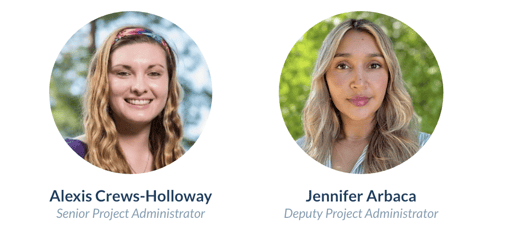
Your HMIS Administrators are happy to help.

Santa Cruz Admins- CrewsHolloway-Arbaca

Phone: 831-713-2288

Email: santacruz@bitfocus.com